Digital Battery Passport SOLUTION

Battery Passports,
from production
to second life.

Connect your value chain, generate passports in bulk and maintain authorised lifecycle information for every battery. All within a brand experience you control.
Book a Battery Passport Demo
right arrow icon
check mark icon
LMT, industrial & EV
check mark icon
Existing-system integration
check mark icon
Role-based access
One connected passport workflow
DigiProd Pass
battery passport workflow
link icon
Information connected to each battery
lock icon
Access governed by role

Different battery realities.

Start with your battery category, production process and data sources. Build a passport workflow around the way your business operates.
LMT

Light means of transport

Connect battery identity and product information with the service networks supporting e-bikes, e-scooters and other light mobility applications.
Manufacturer
right arrow icon
Vehicle
right arrow icon
Service
INDUSTRIAL

Energy storage & equipment

Organise battery records across storage systems and industrial applications, with information connected to operators and maintenance teams.
Battery system
right arrow icon
Operation
right arrow icon
Maintenance
INDUSTRIAL

Electric vehicle batteries

Link component and manufacturing information to individual batteries, then continue through vehicle use, servicing and second-life decisions.
Pack / OEM
right arrow icon
Vehicle use
right arrow icon
Second life
18 February 2027
Battery Passports become mandatory for EV batteries, LMT batteries and industrial batteries above 2 kWh placed on the EU market or put into service. Data applicability differs by category. View EU guidance

The information starts in many places.
Bring it into one passport environment.

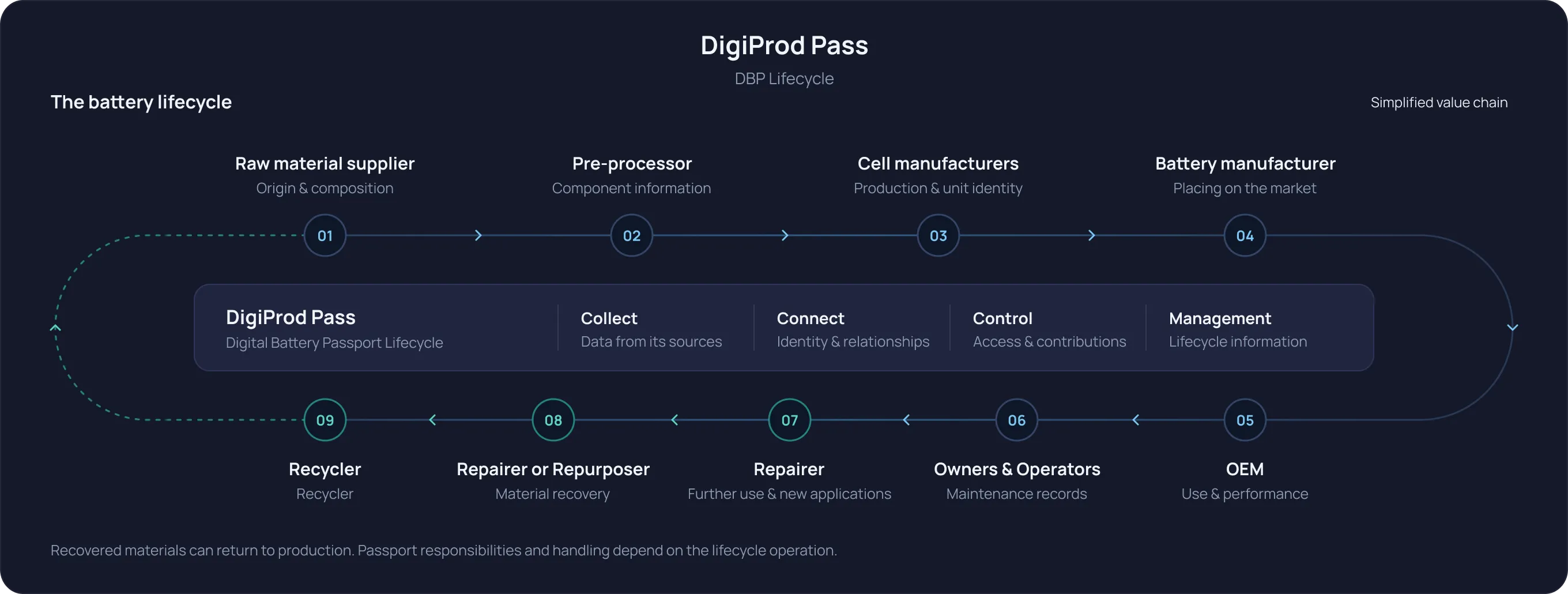
Connect organisations, systems and lifecycle events. Keep information linked to the battery it describes, with clear responsibilities for its maintenance.
Diagram depicting the DigiProd Pass Digital Battery Passport Lifecycle with a simplified value chain of the battery lifecycle, including 9 stages: Raw material supplier (origin & composition), Pre-processor (component information), Cell manufacturers (production & unit identity), Battery manufacturer (placing on the market), OEM (use & performance), Owners & Operators (maintenance records), Repairer (further use & new applications), Repairer or Repurposer (material recovery), and Recycler (recycler). The cycle illustrates the flow of data collecting, connecting, controlling, and managing lifecycle information, with recovered materials able to return to production.

Make the passport
part of production.

Map your production pipeline into the passport-generation workflow. Reuse shared information while keeping every finished battery individually identifiable.
check mark icon
Define the model once. Structure product specifications and the information shared across a battery model.
check mark icon
Connect batch and manufacturing records. Bring component, process and quality information into context.
check mark icon
Generate individual passports in bulk. Associate unit-specific information and a unique identity with each battery.
Discuss your production workflow
right arrow icon
Diagram showing production data flow from three data types: Model data with specs and materials, Batch data with production records, and Unit data with serials and records, leading to Generate passports step for mapping, review, and publishing. Below are three batteries labeled Battery A, Battery B, and Battery C with corresponding demo IDs DEMO-001, DEMO-002, and DEMO-003, each with a passport and QR code.

Build on the systems
you already use.

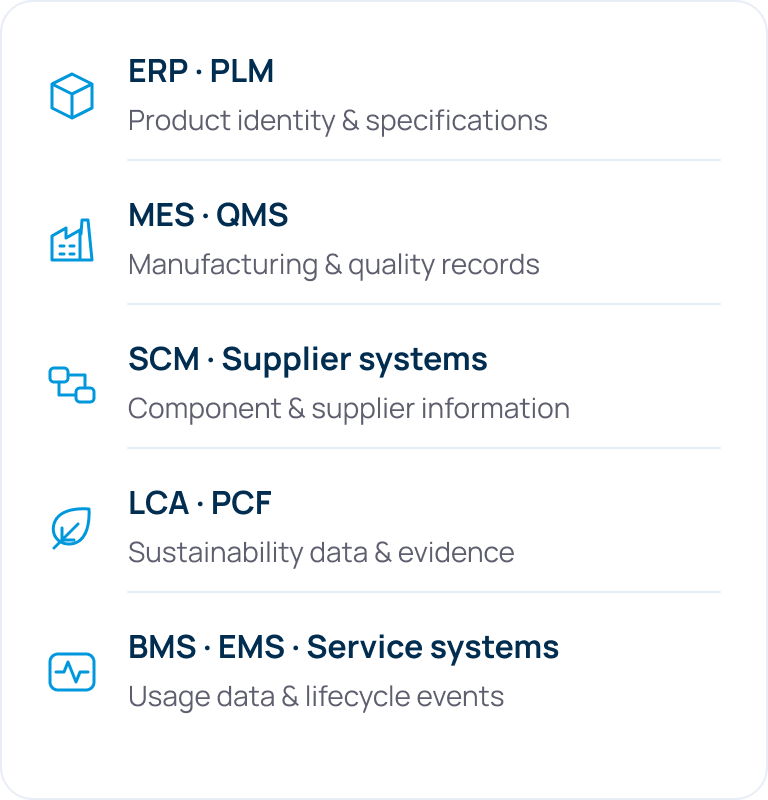
Connect existing enterprise information and value-chain data through an integration approach matched to your systems, formats and data readiness.
01
Source systems
List of source systems with icons and descriptions: ERP and PLM for product identity and specifications; MES and QMS for manufacturing and quality records; SCM and Supplier systems for component and supplier information; LCA and PCF for sustainability data and evidence; BMS, EMS, and Service systems for usage data and lifecycle events.
right arrow icon
02
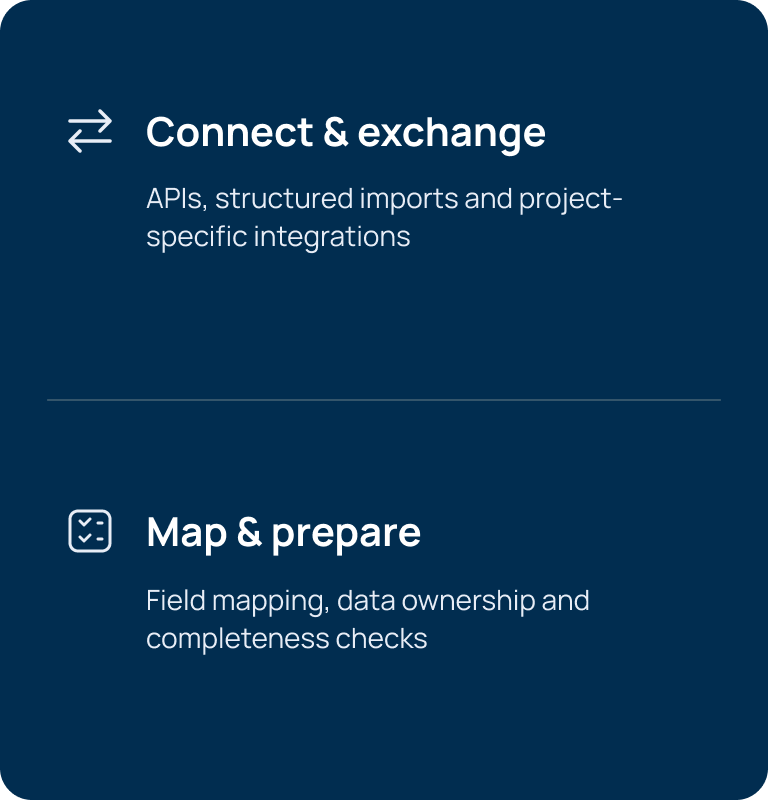
Connect & prepare
Text with two sections on a dark blue background: 'Connect & exchange' with a double arrow icon, describing APIs, structured imports, and project-specific integrations; and 'Map & prepare' with a checklist icon, describing field mapping, data ownership, and completeness checks.
right arrow icon
03
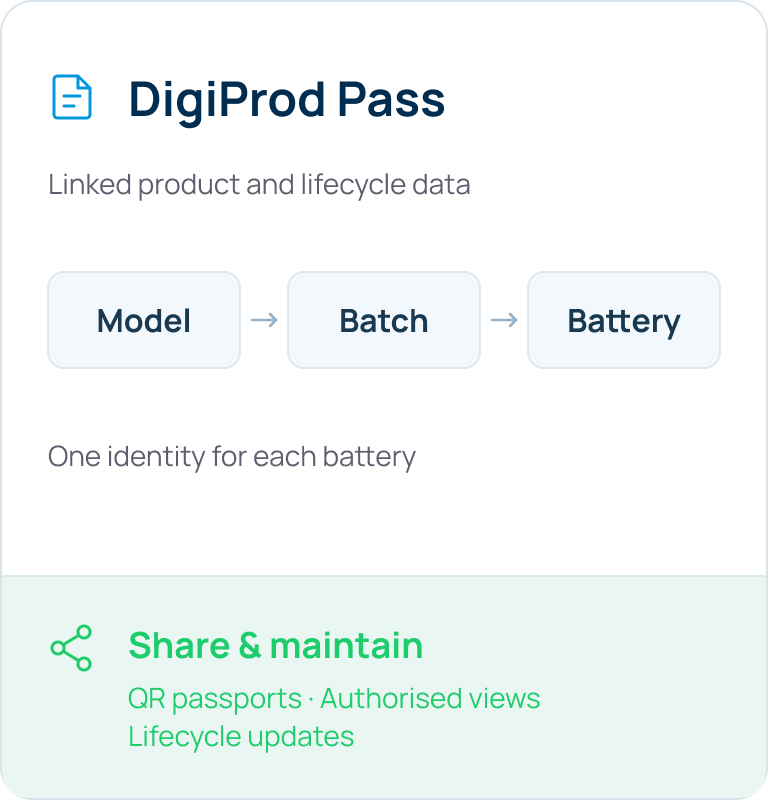
Connected passports
DigiProd Pass interface showing linked product and lifecycle data with a flow from Model to Batch to Battery, indicating one identity per battery, and a section labeled Share & maintain highlighting QR passports, authorized views, and lifecycle updates.
Integration methods and scope are agreed for your environment.
01
Source systems
product icon

ERP · PLM

Product identity & specifications
manufacturing icon

MES · QMS

Manufacturing & quality records
supply icon

SCM · Supplier systems

Component & supplier information
sustainability icon

LCA · PCF

Sustainability data & evidence
operations icon

BMS · EMS · Service systems

Usage data & lifecycle events
right arrow icon
02
Connect & prepare
exchange icon
Connect & exchange
APIs, structured imports and project-specific integrations
checklist icon
Map & prepare
Field mapping, data ownership and completeness checks
right arrow icon
03
Connected passports
document icon
DigiProd Pass
Linked product and lifecycle data
Model
right arrow icon
Batch
right arrow icon
Battery
One identity for each battery
share icon
Share & maintain
QR passports · Authorised views Lifecycle updates

Start with a clear scope.

Build a repeatable process.

Bring your battery application and existing data landscape. Together, define the passport workflow, responsibilities and integration work needed to move forward.
01

Scope & map

Identify battery categories, data sources, responsible teams and information gaps.
02

Configure & connect

Set up the information model, production workflow, access rules and agreed integrations.
03

Pilot & validate

Work through an agreed battery use case with the people and data involved.
04

Roll out & maintain

Extend the process across products, batches, users and lifecycle contributors.

A proposal based on your operation.

Connected product history — each stage builds on the last. Information is carried forward, not duplicated.

Let’s make the
next step clear.

Practical answers for your production, compliance and digital teams.
Read our Battery Passport guide
right arrow icon
Can i see it in action before committing?
up arrow icon
Yes — we offer a free, no-obligation demo to walk you through the platform, show how it fits your business needs, and answer all your questions. To learn more about DigiProd Pass, [Book a Consultation]
Is the platform compliant with the current and future EU regulations?
up arrow icon
Absolutely! DigiProd Pass is fully aligned with existing EU regulations like the ESPR, Battery Regulation, and CSRD, and is built to adapt to upcoming legislative changes. Our compliance engine is regularly updated to reflect the latest requirements and helps ensure you're always audit-ready.
How do I onboard my suppliers and partners in our DPP ecosystem?
up arrow icon
DigiProd Pass makes it easy to onboard external stakeholders with customisable access controls, supplier-specific onboarding flows, and guided data entry support through its state-of-the-art federated Data Space technologies.. You can control the access of the users ensuring your data sovereignty.
Can I update my data with DigiProd pass?
up arrow icon
DigiProd Pass solutions are completely scalable, designed for dynamic product lifecycles. You can add additional information as required at any time. Events during a product’s lifecycle, such as change of ownership, servicing, repairs, or remanufacturing, can be updated within the DPP. With the help of Blockchain technology, all updates and edits are recorded to ensure data immutability. DigiProd Pass can also offer solutions for individual components as well as complete products for full traceability.

How do I add my data to DigiProd pass?
up arrow icon
DigiProd Pass has an easy-to-use data integration mechanism to enable you to input data directly using simple techniques such as “cut and paste”, “drag and drop”, or automatically via integrating your IT systems, such as ERP and PLM systems. Whether you prefer manual uploads or fully automated flows, DigiProd Pass supports both to match your workflow.